Distance based search with Google Maps integration
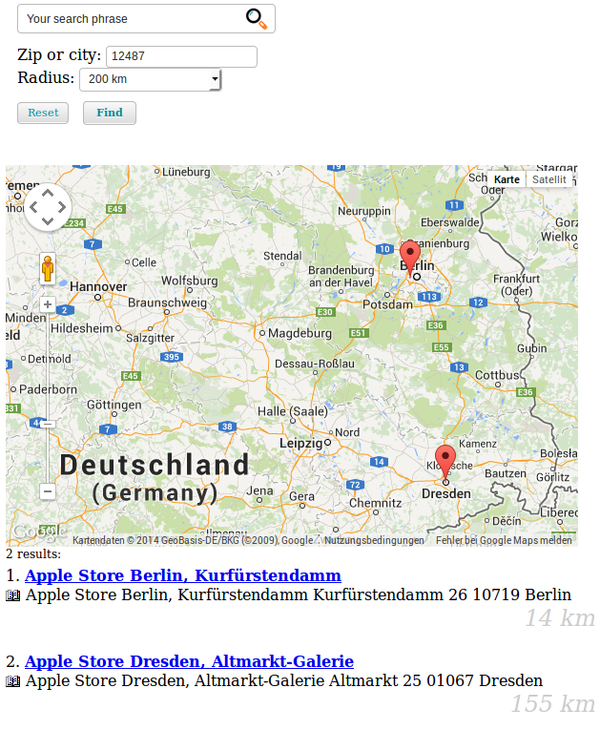
This feature gives you the possibility to search for hits in a certain radius around a given zip or city. The hits may optionally be presented on a map (using Google Maps), additionally the distance is shown in the result list. If you want to avoid loading third-party content in the browser you can only use the distance search without the map.
System requirements
- "curl" has to be installed.
- Activate distance search (see chapter "How to activate the distance search")
- This feature does not work together with the boost keywords feature.
- Since distance calculation is done within MySQL, it is not possible to use "Sphinx" at the same time.
Note
Since version 1.7.3 you can disable Sphinx on certain pages in order to use
the distance search on these pages and Sphinx on other pages. Insert this
into your page TypoScript setup:
ke_search_premium.extconf.override.enableSphinxSearch = 0
How to activate the distance search
Note
Right now only tt_address records are geocoded automatically and can be used for the distance search. The geocoding is done with the fields address, zip, city and country.
- Install "tt_address" and create address records. By default the distance search is based on tt_address. It is possible to use other types of records (see below).
- Go to "Admin Tools" --> "Settings" --> "Extension configuration" --> "ke_search_premium" and enable the distance search in the tab "distancesearch" (option "Enable the distance search")
- Geocoding is done using the Geocoding API provided by Google
(https://developers.google.com/maps/documentation/geocoding/). You need a
Google Geocoding API key for backend geocoding. Set it as
googleapikeyserverin the extension configuration tabdistancesearch. (If there are errors during geocoding, they will be logged to the ke_search log file.) - Map rendering in the frontend uses the Google Maps JavaScript API. You need
a browser key (
googleapikeybrowser) and a Map ID (googlemapsmapid) in the extension configuration tabdistancesearch. The map marker rendering usesgoogle., which requires a Map ID. If no map ID is configured,maps. marker. Advanced Marker Element DEMO_is used as a fallback.MAP_ ID - In the tab "distancesearch" fill out the country field. This is used for geocoding the zip or city in the search form and for the addresses if no country is given.
- In order to display the distance and the map in the frontend, you can place markers in your own template or activate the options "display distance in standard-template" and "display map in standard-template" in the extension-manger.
- If you use the default template, you can show the distance for each result
by activating
Add distance to default templatein the ke_search_premium extension settings in the tabdistancesearch. If you use your own template you can use the variable{distance}in the SubpartResultpartial to show the distance.Row - If you use the default template, you can show the map by enabling
Add map to default templatein the ke_search_premium extension settings. If you use your own template you can use the snippet<div id="map-in thecanvas"></ div> Resultpartial to show the map.List - To show the distance search in the frontend create a filter record of type "Distance search". This filter type does not have filter options.
- Add this filter to the list of filters to be displayed in your plugin "Searchbox and filters".
- Add a indexer configuration of type "Addresses (tt_address)". Geocoding will be done upon the next indexing.
Note
When the distance search is used, the sorting will be changed to "Distance ascending". If sorting links were activated in the frontend, these will be hidden.
Configuration
The distance search configuration can be adjusted using this TypoScript (see
Configuration/):
plugin.tx_kesearchpremium {
    distancesearch {
        templatepath = EXT:ke_search_premium/Resources/Private/Templates/DistanceSearch/
        radiusoptions = 10,20,50,100,200
        radiuslabel = km
    }
}
page.includeCSS.keSearchPremiumGoogleMapsCss = EXT:ke_search_premium/Resources/Public/Css/google-maps.cssGeocode own content
In order to geocode your own content you will have to create a hook in your own extension and do the geocoding.
Please have a look at the hook modify
(ke_) delivered with
ke_search_premium.
Troubleshooting
If geocoding or distance search does not work, please check the following:
- Check if the Geocoding API key (
googleapikeyserver) is correct. - Check if the browser key (
googleapikeybrowser) is correct. - Check if a valid Google Map ID (
googlemapsmapid) is configured when the map is enabled. - Check if the country is set in the extension configuration.
- Check the ke_search log file for errors. If Google Maps returns an error, this will be logged.
Hint
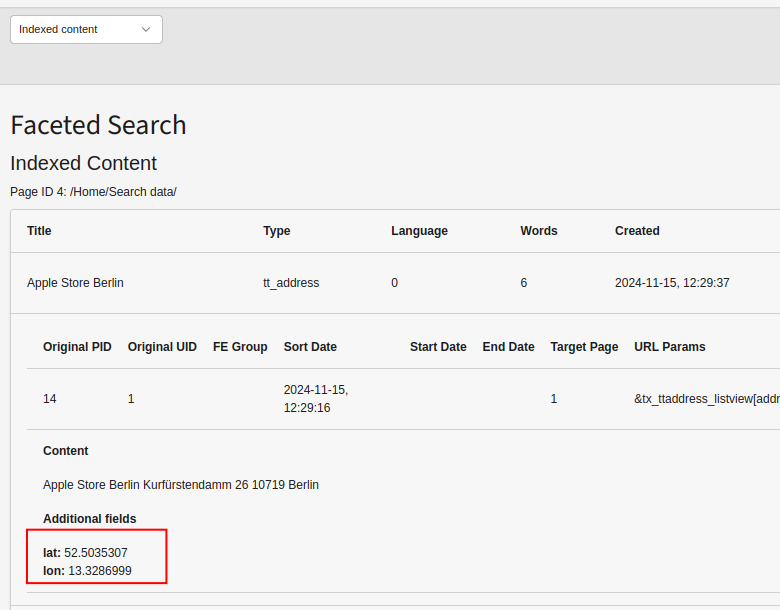
Since ke_search version 6.1.3 you can see the latitude and longitude of the geocoded addresses in the backend. Go to the ke_search backend module and select "Indexed content", select the sysfolder where the index ist stored.