ke_search_premium is a TYPO3 extension which extends ke_search with a number
of additional features:
Custom ranking: values to push results by a fixed value
Boost keywords: push results by keywords
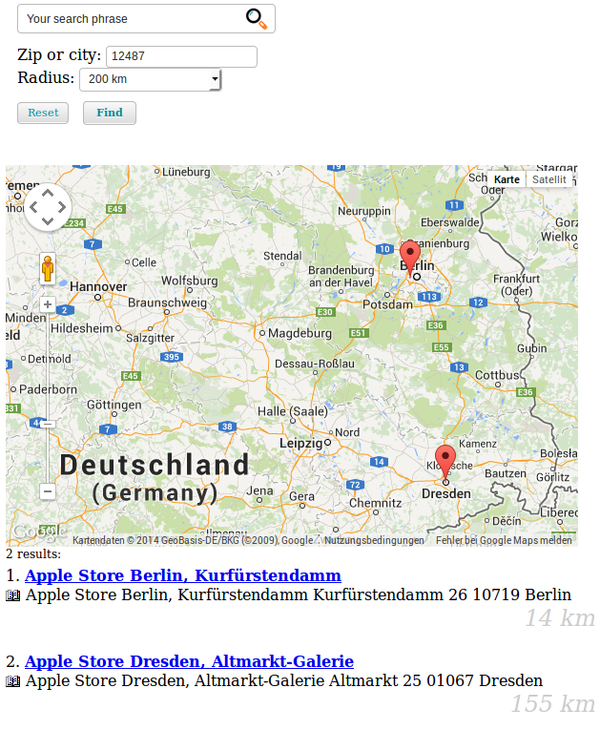
Distance based: Search around a location (city, zip), including Google Maps integration
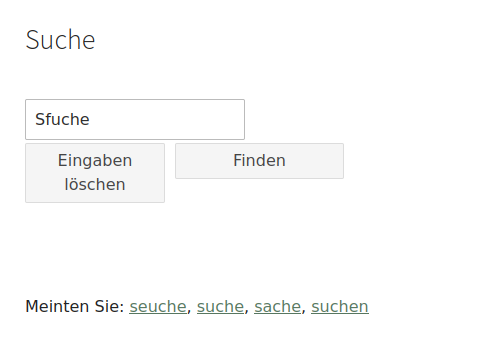
Did you mean: Suggest correct spellings (only in german)
Autocomplete: Suggest search terms while typing (based on searches of other users)
Synonyms: Define synonyms for search terms
In-word-search: Find search strings inside words
Remote indexer: Import search results from another TYPO3 website. This feature makes it possible to search two or more TYPO3 websites using one search form.
Headless: Serve search results via JSON, e.g. for a Progressive Web App
Sphinx: Faster searching (with very large indexes) with Sphinx (needs additional server setup)
System requirements
ke_search_premium is an add-on extension to ke_search.
The "boost keywords" feature allows you to boost results to a higher position in
the result list by assigning keywords. If a search for this keyword is started,
results containing this keyword will be ranked
higher in the result list.
Use case examples
A user searches for "Meier". There's a page about a person called "Meier" in
the index, but there are also lots of other content containing the word
"Meier" in the index. Since "Meier" is not in the title of the page (maybe
the page is called "Our new CEO"), the page is not ranked very high for this
search word. We want the result for the page about "Meier" to be at the top,
therefore we add "Meier" as a boost keyword to the page record.
A user searches for "campingchair". There's a product called "campingchar" and
there are also news articles, and other content containing the word
"campingchair". We want the product result to be at the top, therefore we add
"campingchair" as a boost keyword to that record.
Note
This feature does not work together with the "Sphinx"-feature.
This feature works out-of-the box for pages and news (EXT:news). If you
want to use for other types of data, you will have to add a hook or a
custom indexer.
This feature does not work together with the distance search feature.
Configuration
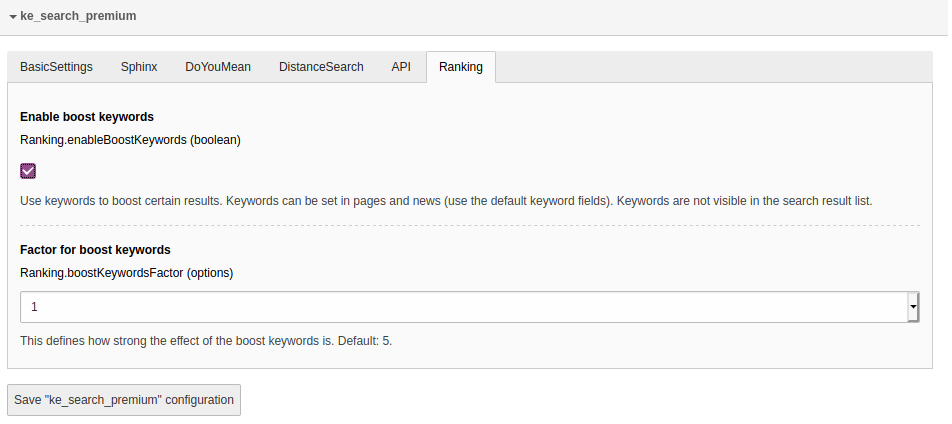
You can enable/disable the boost keywords feature in the settings module in the
extension configuration in the tab "Ranking".
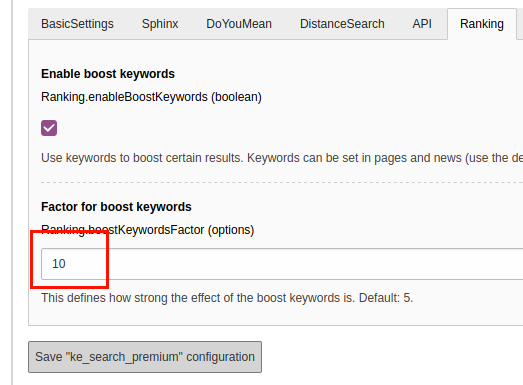
The setting "Factor for boost keywords" allows you to define how strong the
keywords should be weighted which means the higher you set this value, the
stronger the "boost effect" will be.
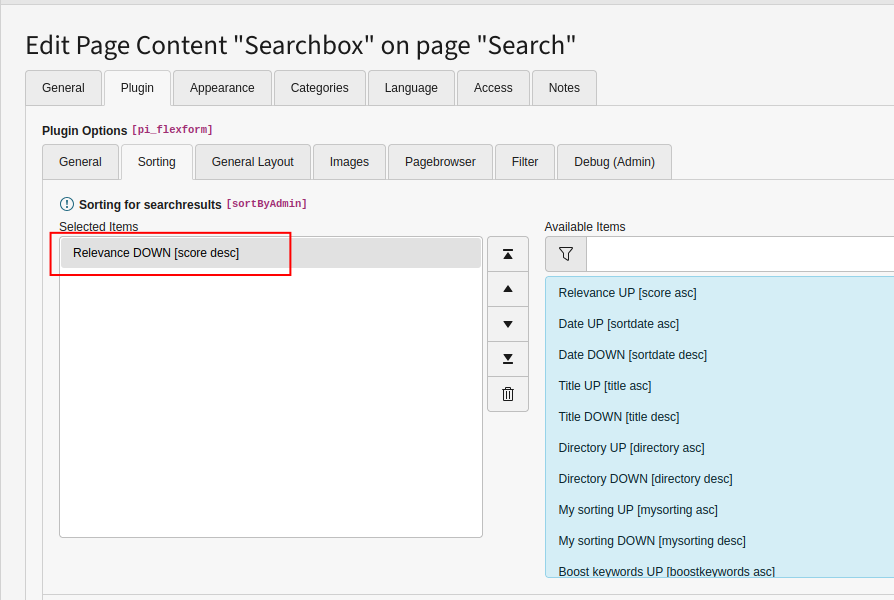
Make sure set the sorting in the search plugin to "Relevance DOWN" in order
to make the feature work!
Usage
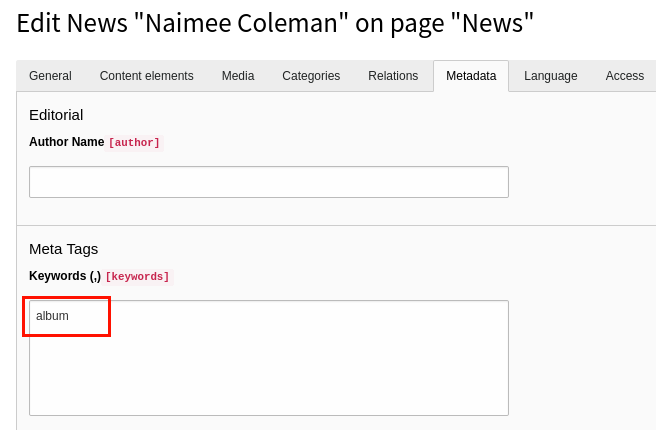
After activating the feature you can use the standard "keywords" field in pages
and news records to add your keywords (comma-separated). The boosting effect
will only work for search words matching exactly the given keywords.
If in doubt which spelling or style the user will use, just add more keywords
(eg "car,cars,vehicle,vehicles").
Example
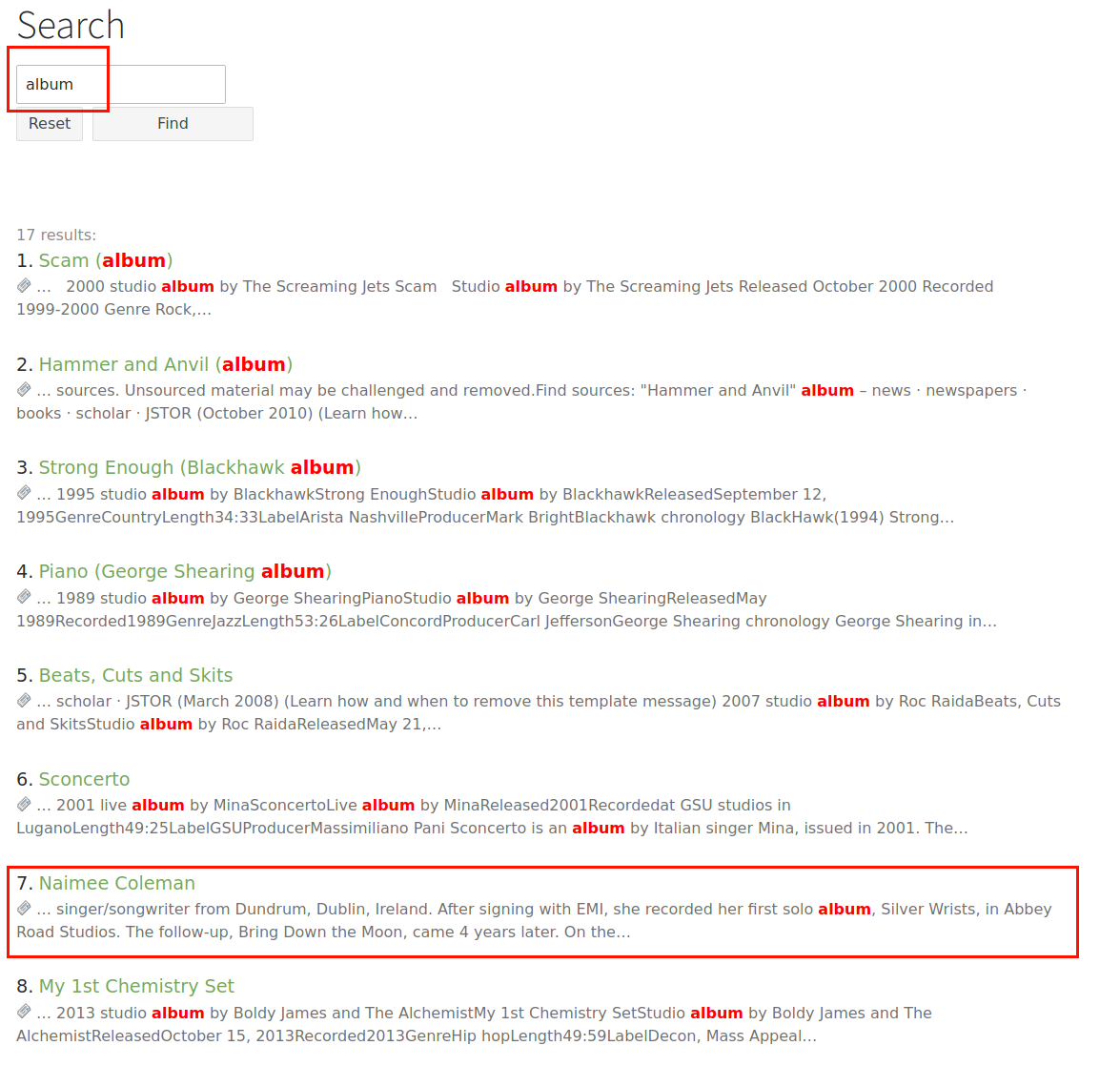
In this example we search for the word "album" in set of randomly imported
articles from wikipedia.
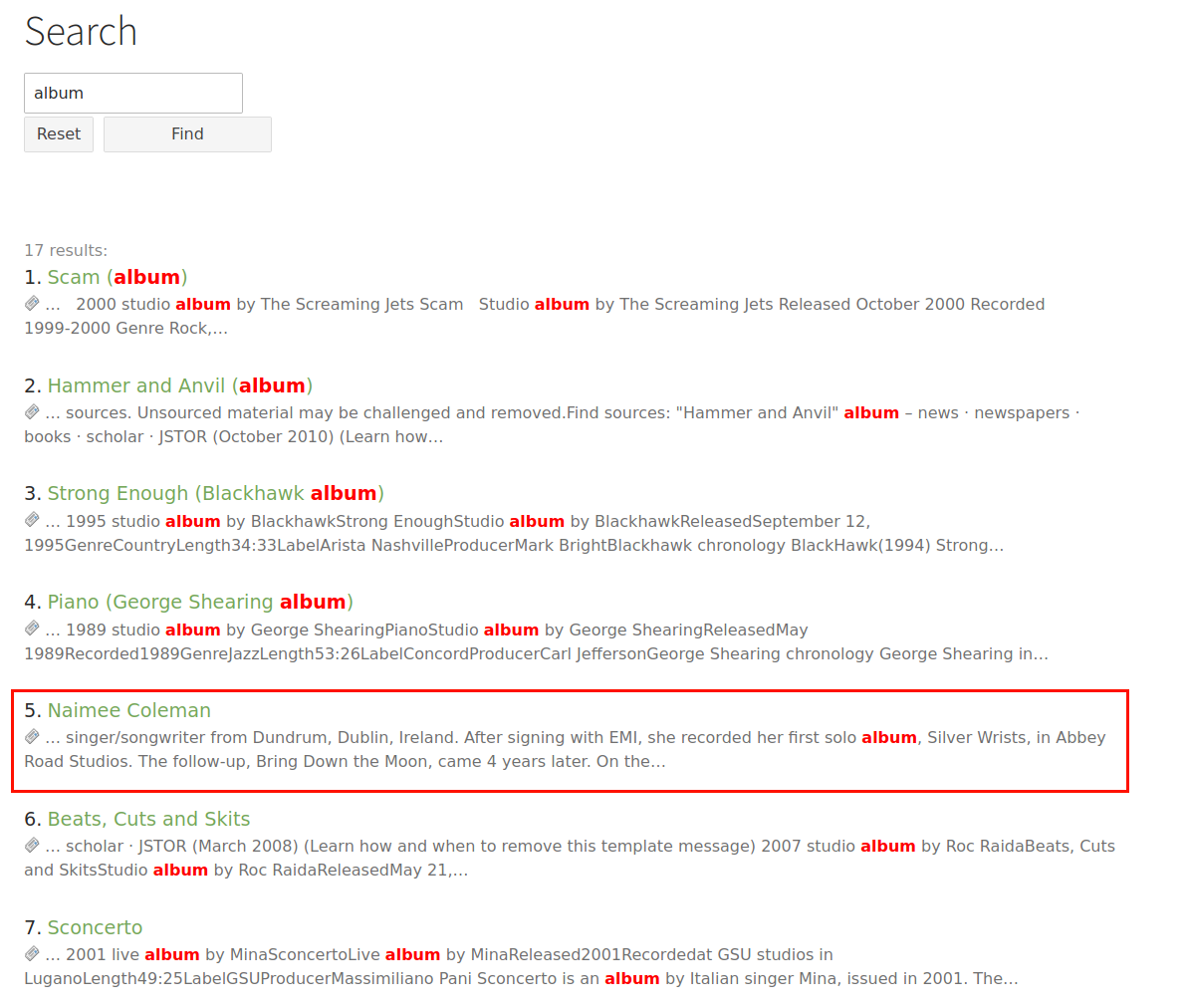
One of the results is the article "Naimee Coleman". Without the boost keyword
feature activated, this results ranks as #7 for the search word "album". We
want this result to rank higher.
We now give the new record the keyword "album".
After activating the boost keywords feature (see above: "Configuration") you
will have to restart the indexer.
The result does now rank higher:
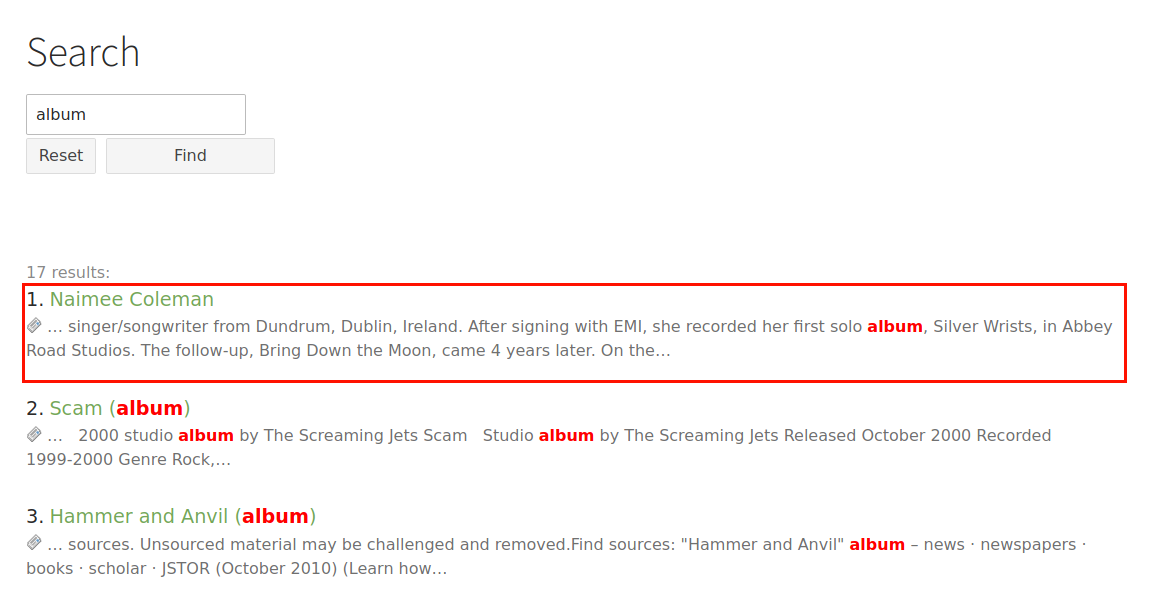
If the effect should be stronger, we can adjust the setting "Factor":
The result is now at the top of the list:
Adding your own keywords
If you want to add your own keywords as boost keywords or if you want to add
keywords to other content types than pages or news, you will have to fill the
column "boostkeywords" of the table "tx_kesearch_index" with your keywords.
You can use the hooks ke_search provides. Please have a look at
Classes/Hooks/BoostKeywords.php
Copied!
Custom Ranking
The "custom ranking" feature allows you to push certain results to the
top or bottom of the result list.
This is done by giving numeric value to pages and indexer configurations. You
can then configure ke_search to sort the result list using this custom value.
If both (pages and indexer configuration) values are set, the will be summed up.
Use case examples
Show all page records before other records (eg. files or news).
Show product pages on top.
Show pages about persons on top.
Show certain results at the end of the list.
Configuration
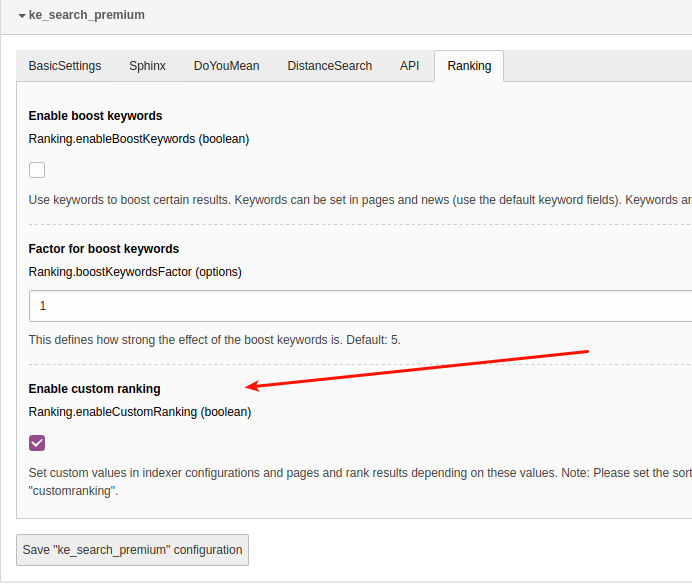
You can enable/disable the custom ranking feature in the settings module in the
extension configuration in the tab "Ranking".
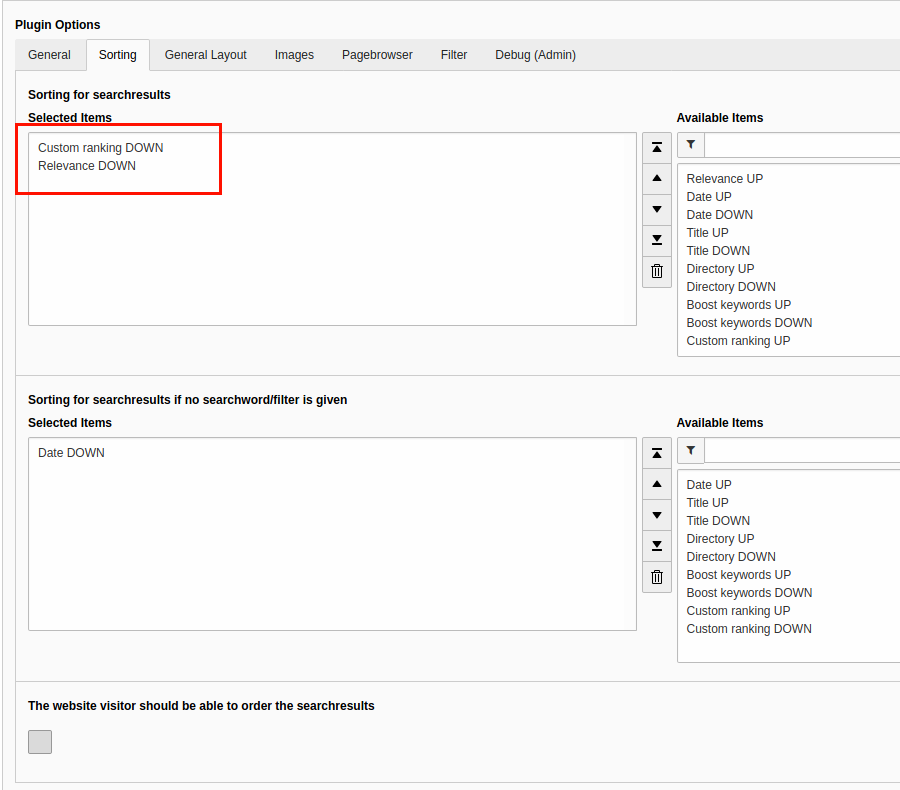
After that please set the sorting to "Custom ranking DOWN" and "Relevance DOWN"
in the plugin options (needs at least ke_search 3.1.5).
Note
It is not possible to let the user set the sorting in the frontend if you
use the custom ranking feature: The Checkbox "The website visitor should
be able to order the searchresults" must not be enabled.
The custom ranking value for pages can (and must) be set for each language
individually. So if you set a value for custom ranking for page in the
default language, remember to set the value also in the translated page
(if you wish so).
Usage
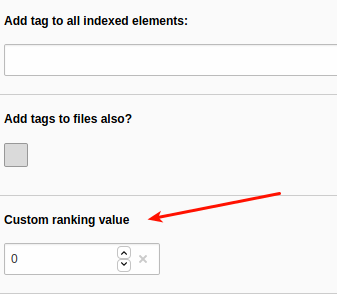
You will find a field "Custom ranking value" in the page properties in the
tab "Search" and in indexer configurations.
By setting this value, the page or the records fetched by this indexer
configuration will be sorted to the very top of the result list. If both values
are set, they will be summed up. You can also set negative values to push
results to the end of the list.
Example
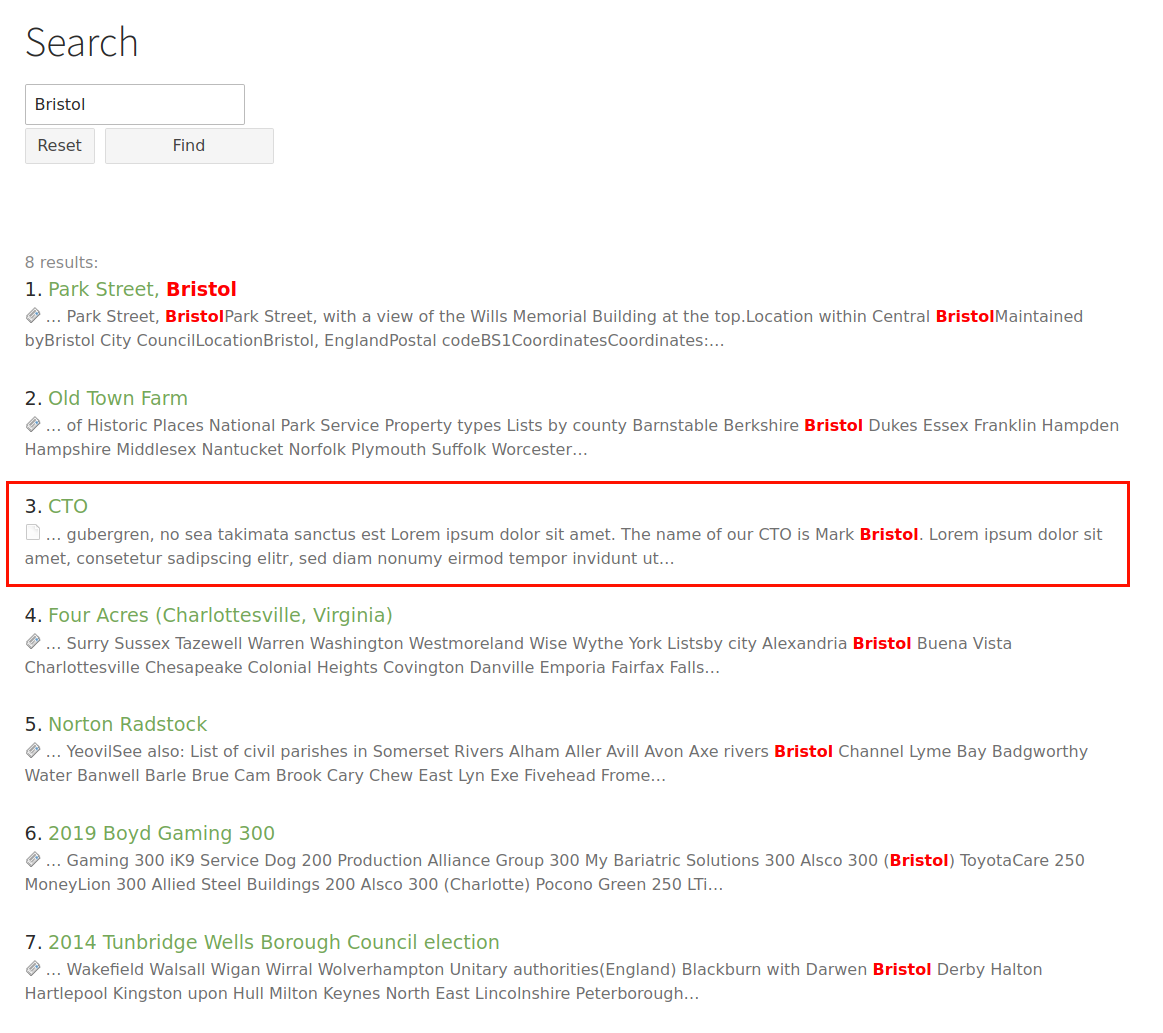
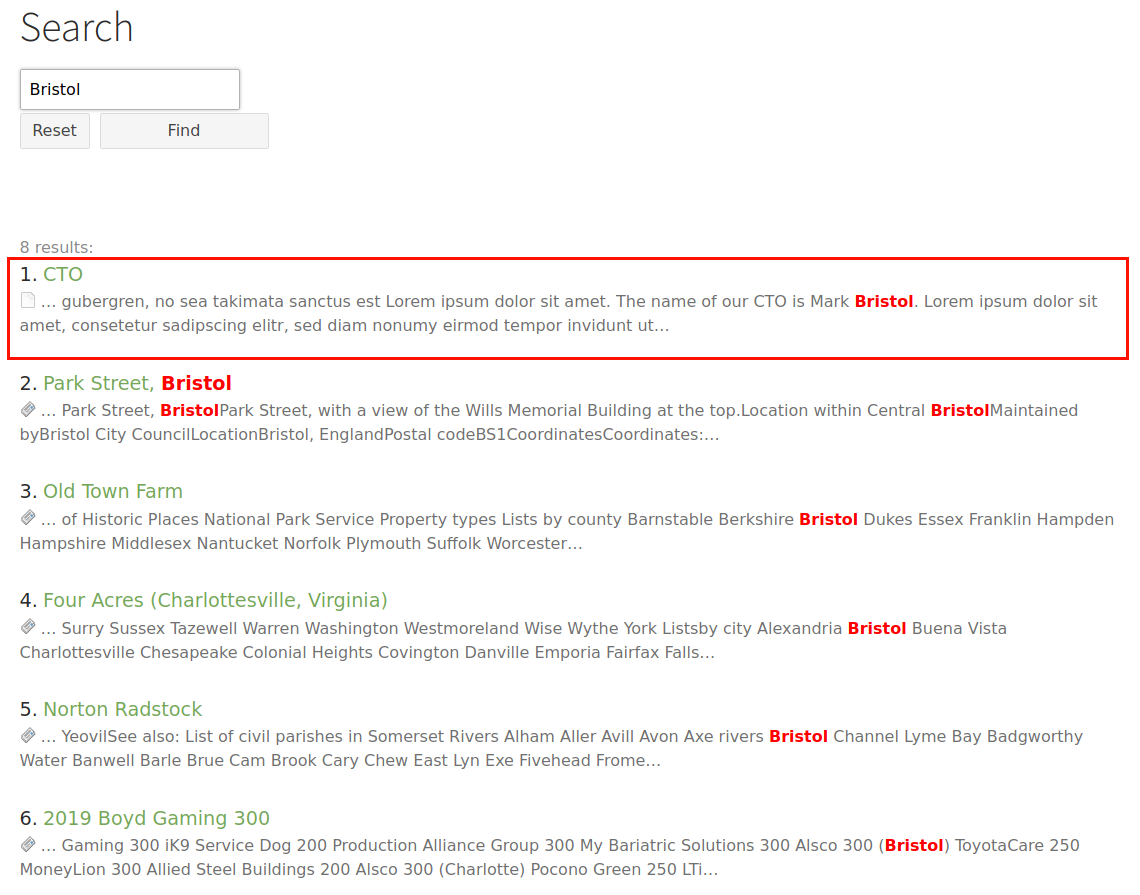
In this example we have a page about the CTO of a company,
"Mark Bristol". Search for "Bristol" shows also some news containing the
word "Bristol".
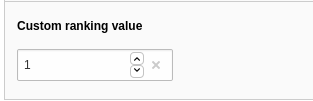
We want to show the "CTO"-page on top of the list, thus we give it a custom
ranking value of "1".
After re-indexing, the page is at the top of the list. Note that this page
now will always be on top of the list, whenever it appears in the search result
list. If you only want to give it a push when someone searches for "Bristol"
you should use the Boost Keywords feature.
Adding your own custom ranking values
If you want to use custom ranking values for your own indexers, you will have
to fill the column "customranking" of the table "tx_kesearch_index" with the
desired value. You can use the hooks ke_search provides. Please have a look at
the Custom ranking hook class at
Classes/Hooks/CustomRanking.php
Copied!
Note
This feature does not work together with the "Sphinx"-feature.
This feature needs at least ke_search 3.1.5 because before that it was not
possible to use multiple sortings.
In-Word-Search
This feature allows to find search strings inside words. Parts of words will be
found even if they are not at the beginning of the word, e.g. searching for
"burg" finds "Hamburg".
Note
This feature does not need Sphinx to be installed, it works natively
with MySQL.
This feature replaces the "in word search" of the Sphinx feature,
so it may result in unexpected behaviour if the "Sphinx"-feature is
also activated.
The indexing time will increase.
Technical background
This features uses the column "content_hidden" of ke_search (introduced in
version 4.5.0) to store partial words which will then be searched but not shown
in the result list.
Use case examples
Find strings even if they are inside other words, e.g. if someone searches
for "store", results with "bookstore" will be found.
Configuration
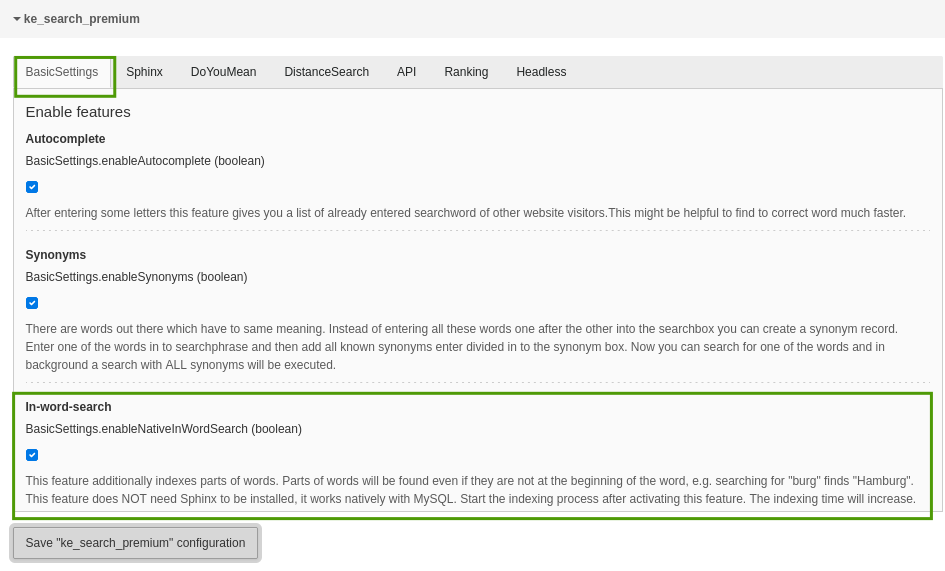
You can enable/disable the in-word-search feature in the settings module
in the extension configuration in the tab "Basic Settings".
After that please do a full indexing.
Usage
Use the frontend search box to find words inside other words.
Example
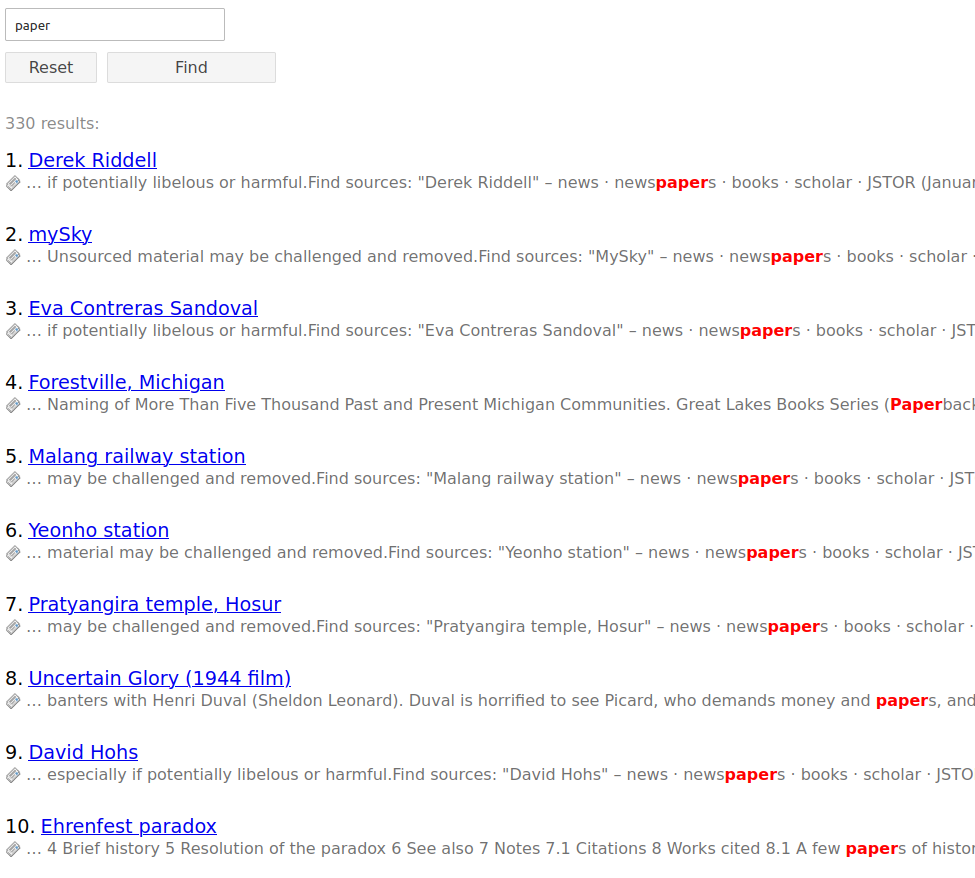
In this example we search for "paper" and find results which contain the word
"newspapers".
Note
This feature needs at least ke_search 4.5.0 because in that version the
column "content_hidden" has been introduced.
Autocomplete
The autocomplete feature proposes search words as the user begins to type.
The phrases proposed in the autocomplete feature are taken from real search
words other users used. Only phrases which gave results in the past are proposed.
The words are taken from the search word statistics table.
To activate this feature, you have to mark the checkbox "use statistics"
on the first tab of the ke_search plugin (activated by default).
With each search, the statistics table will grow and more results will
appear in the autocomplete function.
Since version 5.0.6, the autocomplete feature takes the language into
consideration. If you have a multi-language site and the search words are
different in each language, the autocomplete feature will only propose words
from the language of the current page.
Note
This feature works if you insert the search box as a plugin on a TYPO3
page and also if you create a search box via TypoScript to display it
on every page. However, you may have naming conflicts if you have two search
boxes on the result page, so it is recommended to only have one search box
per page.
For all versions greater than 3.0.0, ke_search_premium does not use jQuery
anymore to implement the autocomplete feature but implements it in
"vanilla javascript".
Content Security Policy (CSP)
Since version 7.0.0, the autocomplete feature is compatible with TYPO3's
Content Security Policy (CSP). The logic is stored in an external JavaScript
file, and configuration data is passed to the search input elements via
data attributes. If your TYPO3 setup uses CSP nonces, these will be automatically
applied to the configuration script.
Configuration
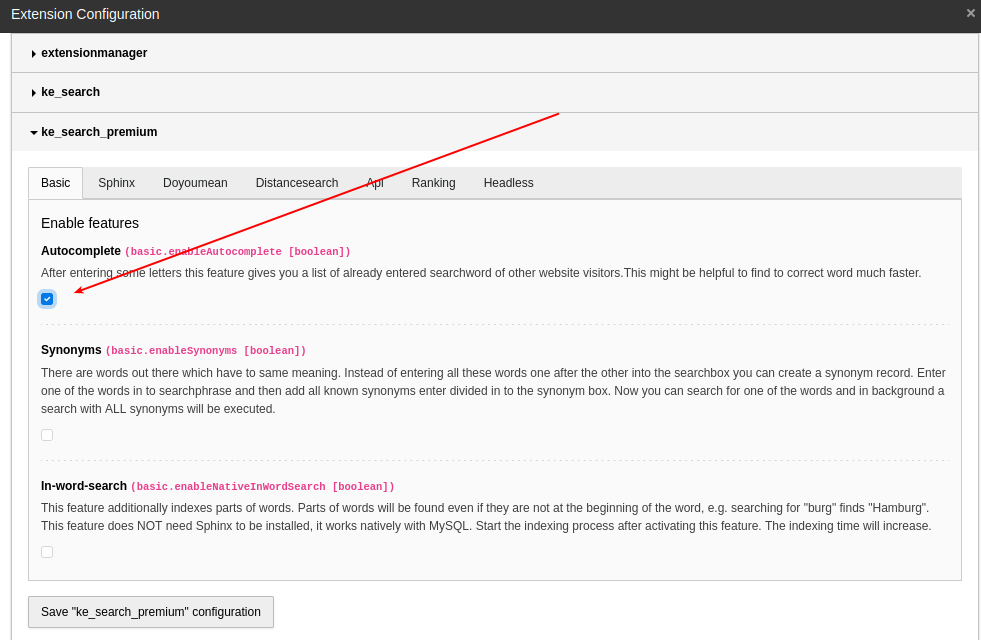
You can enable/disable the autocomplete feature in the settings module in the
extension configuration.
After enabling the checkbox for autocomplete and a "clear cache", the needed
TypoScript files will be included automatically; there's no need to add a
template manually.
Adding your own autocomplete words
If you want to add your own words to the list of proposed words, please have
a look at:
Classes/Middleware/Autocomplete.php
Copied!
There's a hook to include your code (search for "modifyAutocompleWordList").
Configuration options
These are the configuration options for plugin.tx_kesearchpremium_pi1:
Value
Type
Description
Default
amount
Integer
If autocomplete finds a mass of records, it's
better to reduce the results in the select box
to a lower number. In normal cases, 10
results should be enough, but you can
change this value here.
10
Note on JavaScript and CSS files
After activating this feature in the extension configuration, two static TypoScript
files will be included automatically:
In the setup.typoscript file, one CSS and several external JavaScript files are
included:
EXT:ke_search_premium/Resources/Public/Css/auto-complete.css: CSS for styling the suggestions.
EXT:ke_search_premium/Resources/Public/Javascript/auto-complete.min.js: The autocomplete library.
EXT:ke_search_premium/Resources/Public/Javascript/ke_search_premium_autocomplete.js: The initialization logic for autocomplete feature.
If the autocomplete feature does not work as expected, make sure those files
don't conflict with your custom CSS and JavaScript.
Did you mean ... ?
You can activate the feature "Did you mean?" in the extension
configuration of ke_search_premium in the "Doyoumean" tab.
When the "Did you mean?"-feature is activated and a search query does not give
any results, instead of the "no results" message either the correctly spelled
word is displayed or a similar word. After clicking on that word, a new search
will be executed.
Since Openthesaurus.de is German only, this feature makes only sense on german
websites.
Since ke_search_premium version 6 it is possible to disable the feature via
TypoScript. You have to first enable the feature in the extension settings
and can then disable it via TypoScript e.g. for languages other than german.
You have to active "Show individual text if no results were found?" in the
ke_search plugin additionally to activating the feature in the extension
manager.
Configuration
Value
Type
Description
Default
LinkForXml
Wrap
This is the wrapping link which calls the www.openthesaurus.de API to get the result in XML format
With help of this selectbox you can decide if the results of OpenThesaurus should be received as XML or JSON. Be careful: JSON is in BETA status. But on our test systems we havn't found any problem. So it's at you to use JSON or not.
Xml
MaxDistance
Option
The lower this setting is as more equal is the new word to the given search word. A distance of 1 will find "auto" for "autho" but not "paaren" for "parken". In this case you have to set max distance to 2. It seems that the max distance of OpenThesaurus API is 3. So it can be that we will reduce the distance selectbox to 3 in future
2
Distance based search with Google Maps integration
This feature gives you the possibility to search for hits in a
certain radius around a given zip or city. The hits may optionally be
presented on a map (using Google Maps), additionally the distance
is shown in the result list. If you want to avoid loading third-party
content in the browser you can only use the distance search without
the map.
System requirements
"curl" has to be installed.
Activate distance search (see chapter "How to activate the distance search")
This feature does not work together with the boost keywords feature.
Since distance calculation is done within MySQL, it is not possible to use
"Sphinx" at the same time.
Note
Since version 1.7.3 you can disable Sphinx on certain pages in order to use
the distance search on these pages and Sphinx on other pages. Insert this
into your page TypoScript setup:
ke_search_premium.extconf.override.enableSphinxSearch = 0
How to activate the distance search
Note
Right now only tt_address records are geocoded automatically and can be
used for the distance search. The geocoding is done with the fields
address, zip, city and country.
Install "tt_address" and create address records.
By default the distance search is based on tt_address.
It is possible to use other types of records (see below).
Go to "Admin Tools" --> "Settings" --> "Extension configuration" -->
"ke_search_premium" and enable the distance search in the tab "distancesearch"
(option "Enable the distance search")
Geocoding is done using the Geocoding API provided by Google
(https://developers.google.com/maps/documentation/geocoding/). You need a
Google Geocoding API key for backend geocoding. Set it as
googleapikeyserver in the extension configuration tab distancesearch.
(If there are errors during geocoding, they will be logged to the ke_search
log file.)
Map rendering in the frontend uses the Google Maps JavaScript API. You need
a browser key (googleapikeybrowser) and a Map ID (googlemapsmapid) in the
extension configuration tab distancesearch. The map marker rendering uses
google.maps.marker.AdvancedMarkerElement, which requires a Map ID.
If no map ID is configured, DEMO_MAP_ID is used as a fallback.
In the tab "distancesearch" fill out the country field. This is used for
geocoding the zip or city in the search form and for the addresses if no
country is given.
In order to display the distance and the map in the frontend, you can place
markers in your own template or activate the options "display distance in
standard-template" and "display map in standard-template" in the
extension-manger.
If you use the default template, you can show the distance for each result
by activating Add distance to default template in the ke_search_premium
extension settings in the tab distancesearch. If you use your own template
you can use the variable {distance} in the Subpart ResultRow partial to
show the distance.
If you use the default template, you can show the map by enabling
Add map to default template in the ke_search_premium extension settings.
If you use your own template you can use the snippet
<div id="map-canvas"></div> in the ResultList partial to show the map.
To show the distance search in the frontend create a filter record of type
"Distance search". This filter type does not have filter options.
Add this filter to the list of filters to be displayed in your plugin
"Searchbox and filters".
Add a indexer configuration of type "Addresses (tt_address)".
Geocoding will be done upon the next indexing.
Note
When the distance search is used, the sorting will be changed to
"Distance ascending". If sorting links were activated in the frontend,
these will be hidden.
Configuration
The distance search configuration can be adjusted using this TypoScript (see
Configuration/TypoScript/Distancesearch/setup.typoscript):
In order to geocode your own content you will have to create a hook in your
own extension and do the geocoding.
Please have a look at the hook modifyAddressIndexEntry
(ke_search_premium/Classes/DistanceSearch/DistanceSearch.php) delivered with
ke_search_premium.
Troubleshooting
If geocoding or distance search does not work, please check the following:
Check if the Geocoding API key (googleapikeyserver) is correct.
Check if the browser key (googleapikeybrowser) is correct.
Check if a valid Google Map ID (googlemapsmapid) is configured when the map
is enabled.
Check if the country is set in the extension configuration.
Check the ke_search log file for errors. If Google Maps returns an error,
this will be logged.
Hint
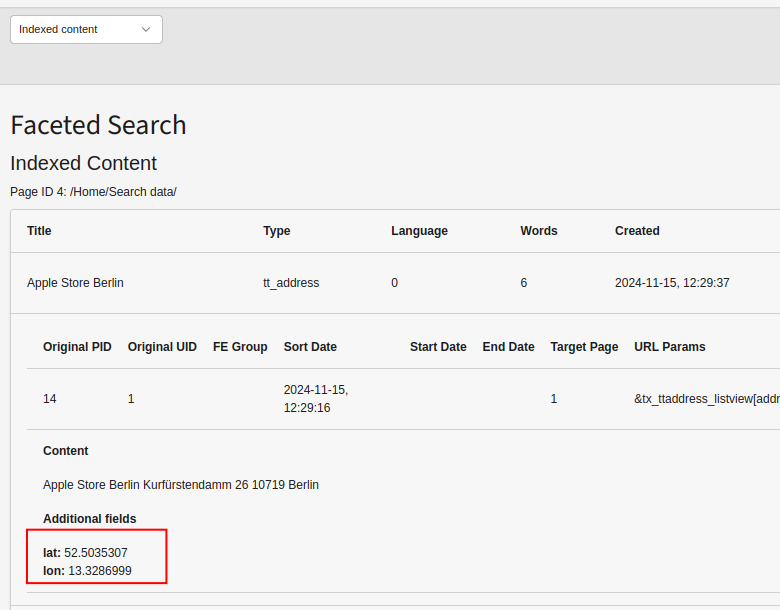
Since ke_search version 6.1.3 you can see the latitude and longitude of the
geocoded addresses in the backend. Go to the ke_search backend module and
select "Indexed content", select the sysfolder where the index ist stored.
Remote indexer
Using the remote indexer you can transfer search results from one TYPO3 instance
to another. In the main instance you can then search both, the main and the
remote index using the same search form.
Configuration steps
Install ke_search_premium in the main and in the remote TYPO3 instance.
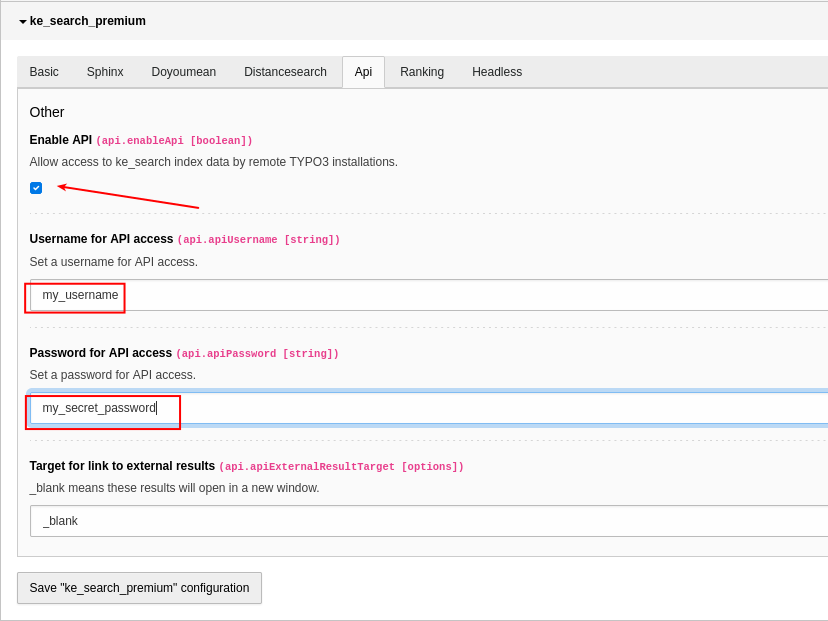
Activate the "API" function in the extension manager.
On the remote website: Set username and password in the "API" tab.
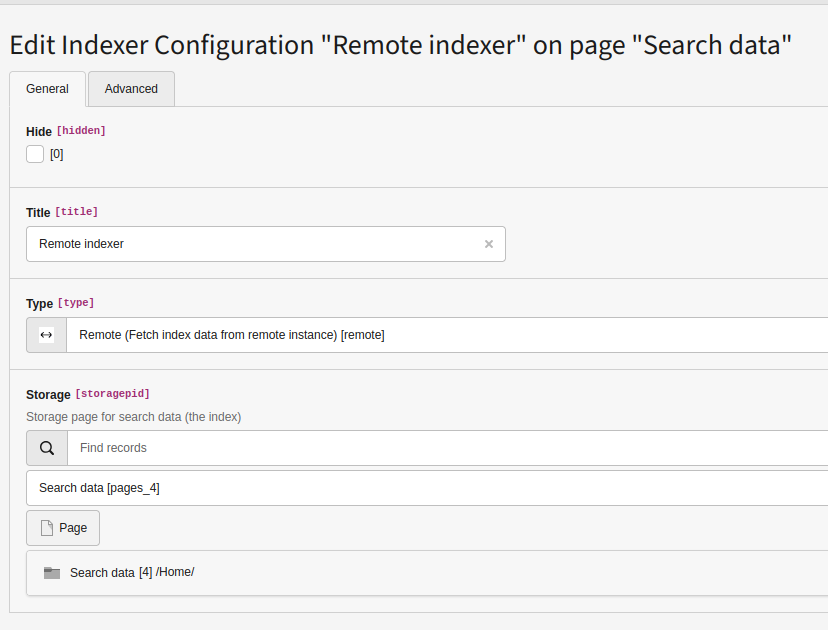
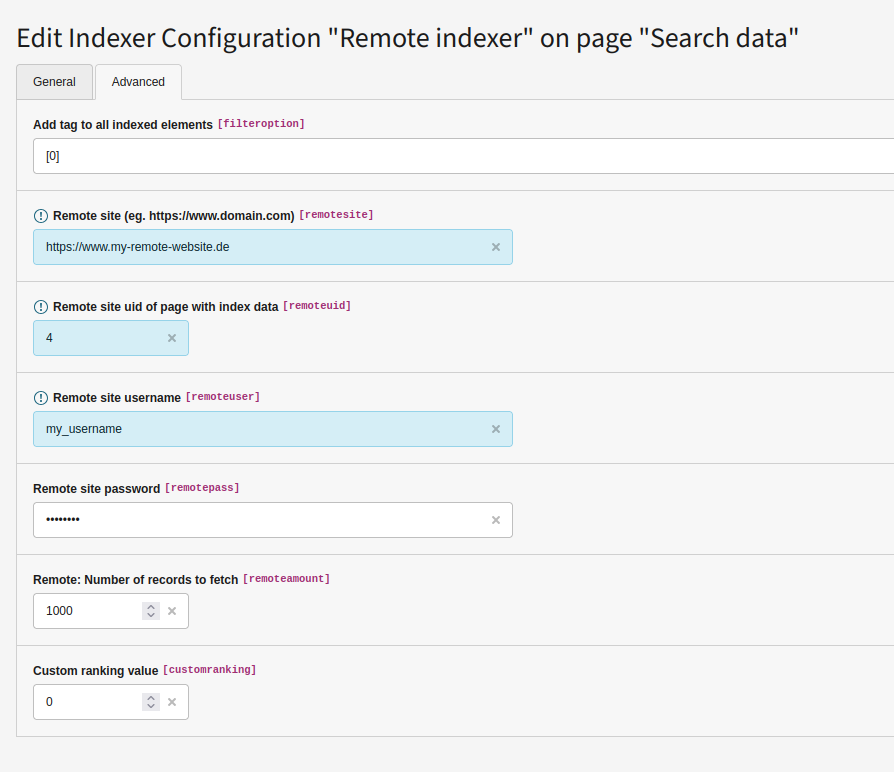
On the main website: Add an indexer configuration. Configure the domain,
login data and page uid on which the search index is saved in the
remote instance.
Starting the indexer will now transfer the data from remote to the main
instance where it can be searched.
You can set a tag in order to use facetting for the transfered data.
Note
Protected content (frontend user group) will not be transferred.
Content for files will be transferred, but the links won't work. This is
currently not implemented.
Fetching the data is done via a SOAP request. The remote instance must
be accessible via SOAP. You must have the PHP SOAP extension installed.
Activate API function
Add an indexer configuration
Sphinx
The support of Sphinx for the MySQL fulltext search can speed up ke_search
queries. This is useful particularly for large search indexes.
The performance depends on the server that is hosting ke_search.
On some machines Sphinx can be useful with 1.000 index entries. On other
hardware the performance is possibly still quite good using the standard MySQL
index with 10.000 index entries.
An additional benefit is the ability to make use of the "in-word-search"
capabilities of sphinx (see below). But this feature can also be used without
Sphinx, see In-Word-Search.
Restrictions
There are some restrictions to take into account if you want to use the Sphinx
feature:
starttime and endtime restrictons won't be applied. So make sure you
do not need those restrictions in your search results.
Please follow these steps to activate the Sphinx support for ke_search:
Install Sphinx
This feature is tested whith Sphinx 2.2.11. Please make sure to use that
version. Newer versions of Sphinx 2 may work. Sphinx 3 will most
likely not work.
Configure the install path with --prefix or Sphinx will be
installed to /usr/local/ what requires root permission on the machine.
Build sphinx:
wget http://sphinxsearch.com/files/sphinx-2.2.11-release.tar.gz
tar xzf sphinx-2.2.11-release.tar.gz
cd sphinx-2.2.11-release/
./configure --prefix=/var/www/my_directory/sphinx
make
make install
Copied!
Troubleshoting
Try this if the error ERROR: cannot find MySQL include files. happens:
sudo apt-get install libmysql++-dev
Copied!
Example: Install necessary packages in ddev environment with MariaDB:
sudo apt-get install build-essential libmariadb-dev-compat make
Copied!
Try the following command if the error g++ not found occurs and start make install again:
The Sphinx deamon can be started with searchd command, e.g.
cd /var/www/my_directory/sphinx/bin/
./searchd
Copied!
Note
The deamon has to run permanently. Make sure that the deamon gets started
automatically after a server reboot.
Configure TYPO3 extension
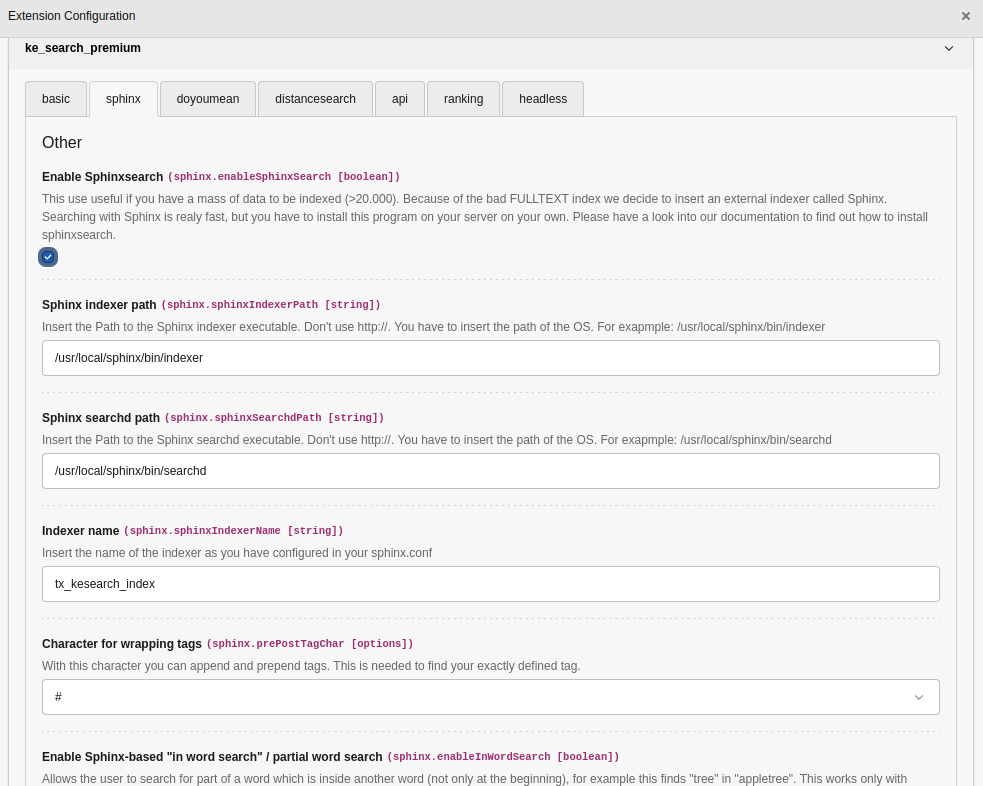
Go to the extension settings of ke_search_premium in the TYPO3 backend.
Activate the Sphinx support with setting enableSphinxSearch in tab Sphinx
Configure the paths to the Sphinx binaries indexer and searchd
Start ke_search indexer
After configuring of the extension you can start the ke_search indexer.
Go to backend module Faceted Search and choose function Start indexing.
After that the search queries will be processed by Sphinx.
Enable "in word search" / partial word search
Allows the user to search for part of a word which is inside another word (not
only at the beginning), for example this finds "tree" in "appletree".
Note
"In word search" can also be used without Sphinx, see In-Word-Search.
You can enable this feature in the extension settings of ke_search_premium.
You have to configure sphinx to allow search within words. Change your
sphinx.conf like this
min_infix_len = 1
min_prefix_len = 0
Copied!
Restart the sphinx daemon and reindex.
You have to enable partial word search also for the ke_search main extension
in the extension settings.
Sphinx error: sort-by attribute sortdate not found
Amend the Sphinx configuration in file sphinx.conf as follows if error
sort-by attribute 'sortdate' not found occurs:
source tx_kesearch_index {
	type = mysql
	sql_host = ...
	sql_user = ...
	sql_pass = ...
	sql_db = ...
	sql_query_pre = SET NAMES utf8
	sql_query = SELECT uid, title, tags, content, sortdate, CONCAT('_group_', REPLACE(IF(fe_group="", "NULL", fe_group), ',', ',_group_')) as fe_group, CONCAT('_language_', language) AS language FROM tx_kesearch_index
	sql_field_string = title
	sql_field_string = language
	sql_field_string = fe_group
	sql_attr_timestamp = sortdate
}
Copied!
Synonyms
With this feature, you can add synonyms for search phrases. When a user
then searches for a something, the search query is extended by the synonyms.
These synonyms have to be added by an editor, there are no predefined synonyms.
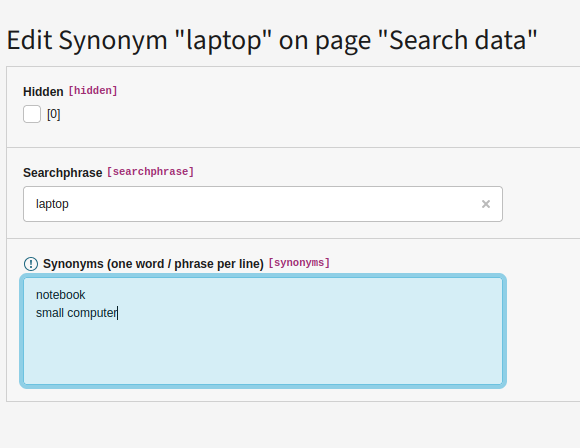
In a "Synonym" table you can add a search phrase and the corresponding synonyms.
Example:
If someone searches for "laptop" you can create a new synonym record to search
also for "notebook".
The search will be executed in an OR combination. You can add more than one
synonym for a given search phrase.
The synonym feature will not work together with the Sphinx feature.
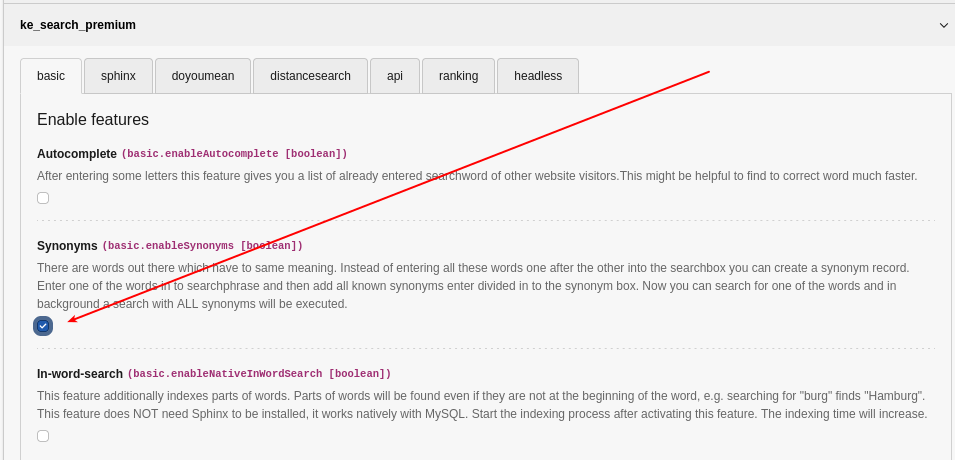
Activate the synonym feature
Please activate this feature in extension configuration first.
Add synonyms
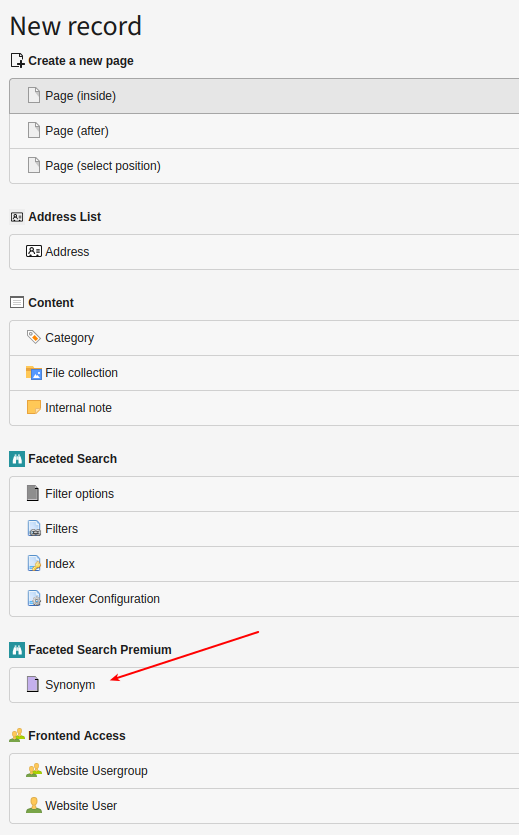
In order to add synonyms, please use the "List" module, and add "Synonym"
record in your search storage page (where your indexer configuration is stored).
You have to enter each synonym in one line (divided by a line break).
Note
Synonyms are added as "phrases". That means your synonym must exactly appear
in your content as written in the synonym list.
Example: You add some synonyms for the search word "laptop" (as in the
screenshot above). If you enter "notebook" as a synonym, but your content
only contains "notebooks" (plural), it will not be found. You will have to
add "notebooks" as a synonym as well (in a separate line).
Note
The synomyms are also used "backwards".
Example: Your search word is "laptop" and you have added "notebook" as a
synonym. If you now search for "notebook", the search will also find
results for "laptop".
Headless
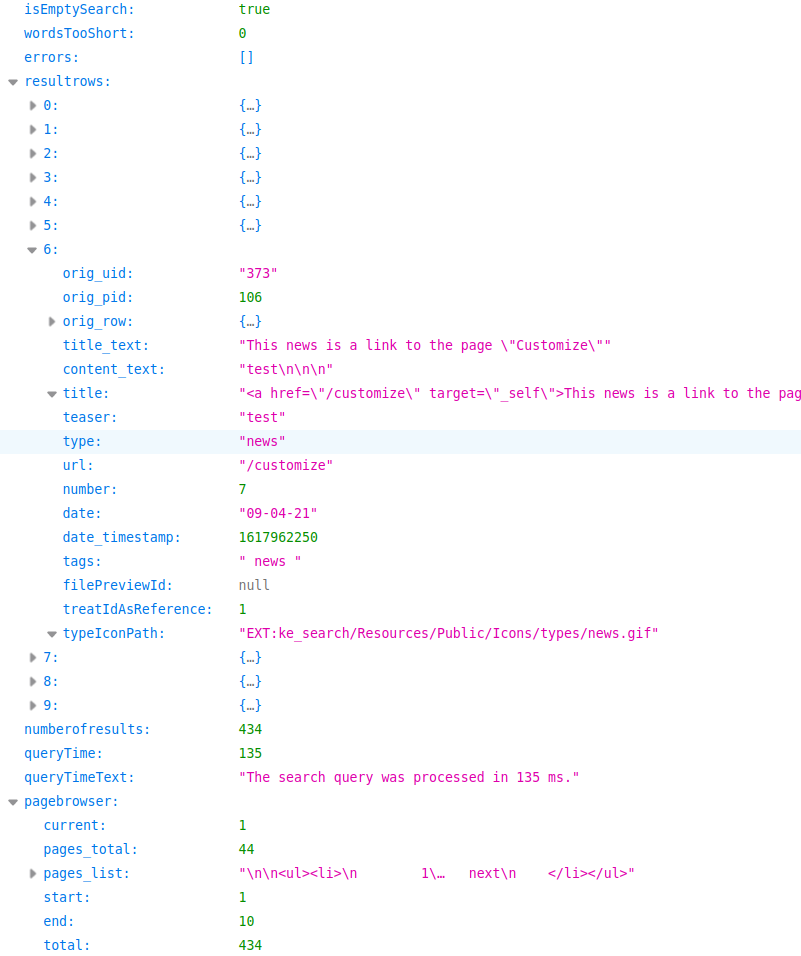
The "headless" feature allows you to receive the output of ke_search in JSON
format to process is in a headless application.
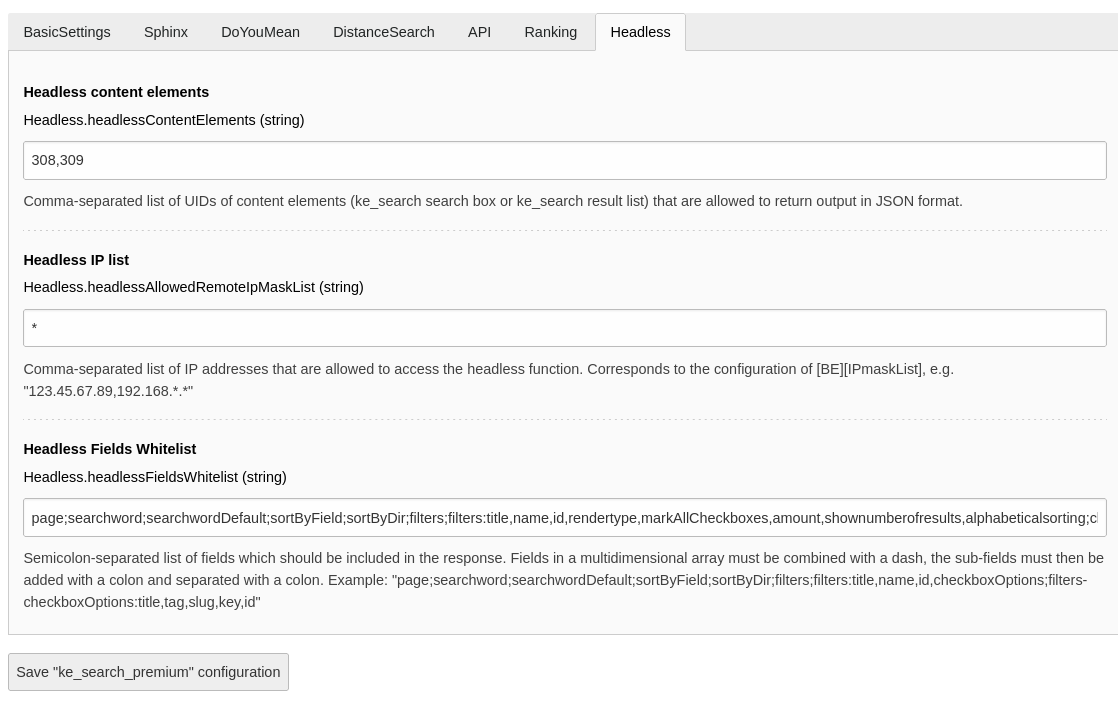
In the extension manager you can specify the UIDs of the ke_search content
elements and the IP addresses which should be allowed to access the headless
function.
Use case examples
Render search results with AJAX.
Create a headless application and use ke_search in the backend.
Configuration
Please install and configure ke_search, the indexers and the plugins as if you
would use ke_search in non-headless context (see "Quickstart" in the
ke_search documentation).
You can then use the extension settings module, open the "Headless" tab in the
ke_search_premium settings and specify the UIDs of the ke_search plugins you
want to make available for headless response.
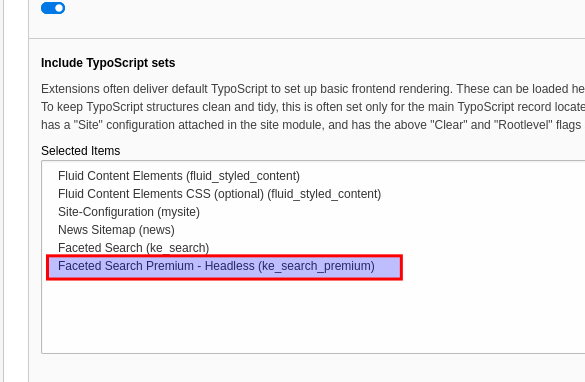
After that you need to include the static template
"Faceted Search Premium - Headless" in your main template.
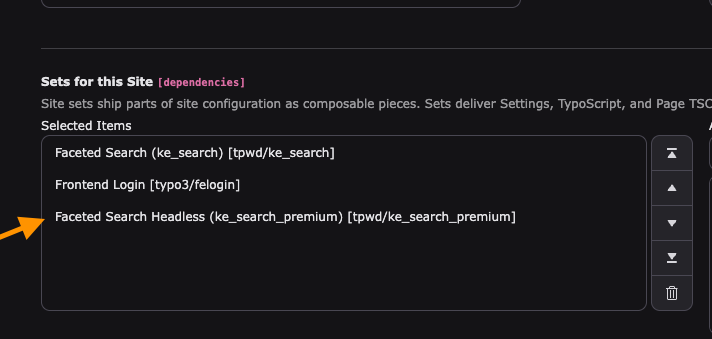
Alternatively, if you are using site sets, you can add the site
set "Faceted Search Headless".
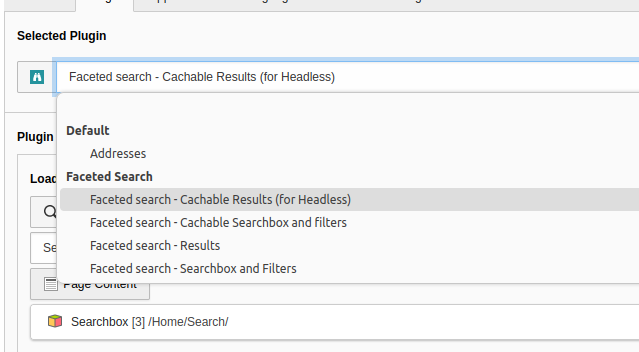
A new plugin will appear and you need to switch both search plugins (searchbox
and result list) to their "cachable" versions.
Please also specify the IP address(es) from which access to the headless
function should be allowed. Although it is possible to use "*" to make the
headless function publicly available, it is recommended to limit the access to
only the IP address of your application, because the response will include full
database rows e. g. from the pages table (in the "orig_row" property) which may
disclose information you want to keep private.
You will also need to specify the fields which should be exposed to the public
by defining a whitelist. This is a semicolon-separated list of fields which
should be included in the response. Fields in a multidimensional array must be
combined with a dash, the sub-fields must then be added with a colon and
separated with a colon.
Install and configure ke_search, the indexers and the plugins as if you would
use ke_search in non-headless context.
Open the extension settings module and go to the "Headless" tab.
Specify the UIDs of the ke_search plugins you want to make available for
headless response.
Specify the IP addresses which should be allowed to access the headless
function.
Specify the fields which should be exposed to the public by defining a
whitelist.
Clear the cache
Add the static template "Faceted Search Premium - Headless" to your main
template. This static template will only appear after you have set the UIDs
of the content elements in the extension settings. Important: Make sure
you put the static template on the root page of your installation, even
if you use the headless feature only on a subpage because the headless
function is accessed via a middleware and the configuration will only take
effect if you put it on the root page.
Alternatively, if you are using site sets, you add the site set
"Faceted Search Headless".
Switch the search box plugin from "Faceted search - Searchbox and Filters"
to "Faceted search - Cachable Searchbox and Filters".
Switch the result list plugin from "Faceted search - Results" to
"Faceted search - Cachable Results" (this plugin will only appear after you
have et the UIDs of the content elements in the extension settings).
Note
For rendering the JSON response it is necessary that a definition
for rendering the ke_search plugins is available. In most TYPO3 installations
the system extension fluid_styled_content does this job and the headless
feature has been tested with fluid_styled_content. Therefore it is
recommended that you use that extension. If you use
fluid_styled_content make sure you include the TypoScript ("static
template") before the ke_search_premium TypoScript.
If you don't want to use fluid_styled_content make sure that you provide
your own rendering definitions for plugins. As a starting point you can have a
look at how fluid_styled_content defines how plugin content elements
("CType: Generic") should be rendered.
Overwriting the headless response
There is also a hook which you can use to overwrite the configuration for the
headless response. The hook is called "modifyHeadlessConfiguration". See Class
Classes/Middleware/HeadlessApiMiddleware.php
Copied!
Usage
You can access the headless function by adding the parameter
"tx_kesearch_pi1[headless_ce]" to specify the content element from which you
want to receive the JSON response. The other parameters are the same as you
would access ke_search in non-headless mode. Please add the "no_cache"
parameter.
Examples
For the following examples we assume that the content element with the UID 308
is our search box plugin and the UID 309 is our search result plugin.
Default result list
Calling the result list plugin without any further parameters will give you the
first 10 results (if not configured otherwise in the plugin settings).
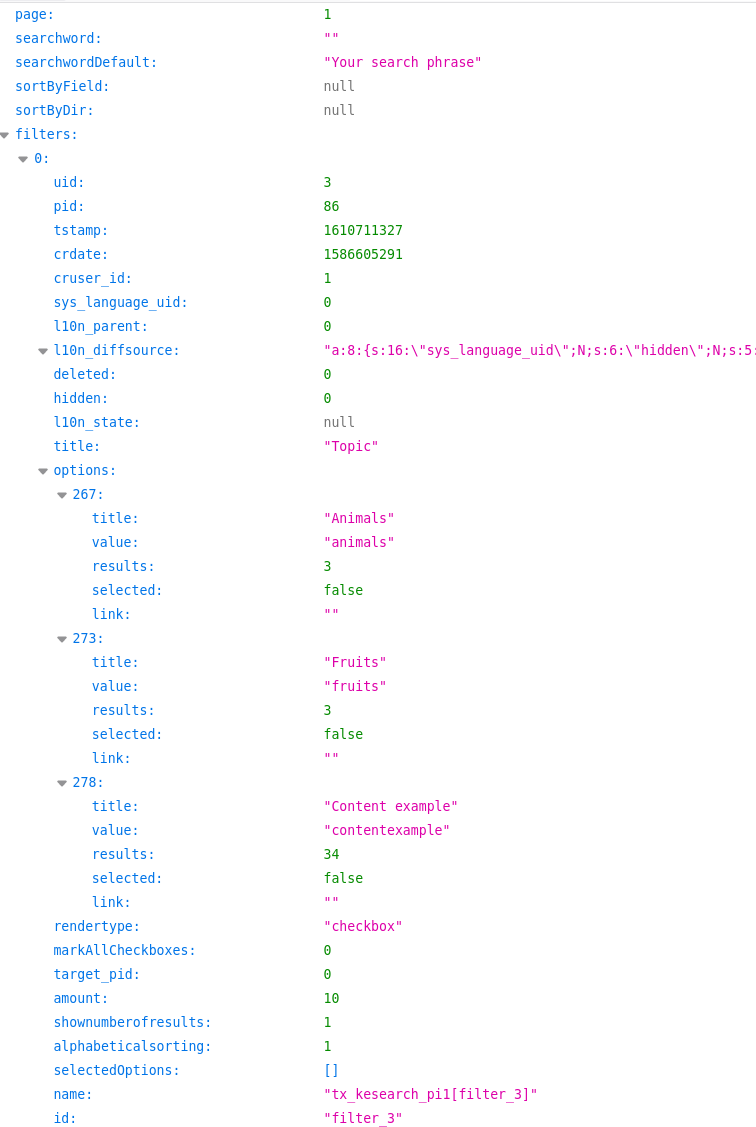
You can use all the parameters ke_search supports in the non-headless mode
(like sorting, pagebrowser settings etc.):
sword
filter
page
sortByField
sortByDir
Note
This feature needs at least ke_search 3.8.1.
Upgrading from ke_search_premium 5 to 6
If you have previously used the headless feature in ke_search_premium 5, you
will need to update the "Type" of result list content element from
"Insert Plugin" to "Faceted search - Cachable Results".
Changelog
Version 7.0.0 (18 June 2026)
[!!!] This version works with TYPO3 14 and 13 and drops support for TYPO3 12.
[FEATURE] Improve autocomplete feature by adding compatibility with TYPO3's Content Security Policy (CSP).
[TASK] Make Distance Search and Google Maps rendering compatible with TYPO3 CSP by adding nonce-aware inline assets and dedicated CSP directives.
[TASK] Bump TYPO3 and ke_search version requirements to support newer versions.
[TASK] Remove TYPO3 12-specific hook for query modification.
[TASK] Update composer dependencies to align with TYPO3 13 and 14 compatibility.
[TASK] Add unit tests for Autocomplete feature
[TASK] Migrate Google Maps marker rendering from deprecated google.maps.Marker to google.maps.marker.AdvancedMarkerElement and add extension setting googlemapsmapid (fallback: DEMO_MAP_ID).
[TASK] Add extension title to localization file (for usage in the new record wizard)
[TASK] Add extension title in composer.json description (for usage in the extension manager)
[TASK] Migrate remote indexer: Refactor FetchIndexEntries and Api middleware
[TASK] Refactor modifyFieldValuesBeforeStoring to simplify checks and improve null handling
[TASK] Integrate request handling in Headless API and DistanceSearch classes
[TASK] Add site set for Headless API
[BUGFIX] Adjust return property type in class KeSearchPremium (Sphinx API) to allow false to allow logging of errors
[DOCS] Add alternative text for images in feature documentation to improve accessibility
Version 6.0.3 (11 November 2025)
[BUGFIX] Correct handling of synonyms in ModifySearchWords class to avoid problems with "explicit and" setting
Version 6.0.2 (26 August 2025)
[BUGFIX] Show missing FlexForm in cached result list plugin
[BUGFIX] Fix potential null return in preg_replace usage
[BUGFIX] Fix dependency range for ke_search
Version 6.0.1 (4 April 2025)
[BUGFIX] Fix bug with boost keywords in ke_search 6.2.0 and above
Version 6.0.0 (20 December 2024)
[!!!] This version works with TYPO3 13 and 12 and drops support for TYPO3 11.
[TASK] Update requirements, require TYPO3 12 or 13, drop TYPO3 11
[TASK] Make DistanceSearch feature compatible with TYPO3 13
[TASK] Add type declarations in NoResultsHandler
[TASK] Make "Did you mean" feature compatible with TYPO3 13
[TASK] Make it possible to disable "Did you mean" via TypoScript
[DOCS] Update documentation on "Did you mean" feature
[TASK] Make Sphinx you mean" feature compatible with TYPO3 13
[BUGFIX] Fix index so that sphinxLimit setting is visible in the extension manager
[DOCS] Update documentation on Sphinx feature
[TASK] Make Autocomplete feature compatible with TYPO3 13
[DOCS] Update documentation on Autocomplete feature
[TASK] Make Synonym feature compatible with TYPO3 13
[DOCS] Update documentation on Synonym feature
[TASK] Make Remote Indexer feature compatible with TYPO3 13
[DOCS] Update documentation on Remote Indexer feature
[TASK] Make Custom Ranking feature compatible with TYPO3 13
[DOCS] Update documentation on Custom Ranking feature
[TASK] Make Boost Keywords feature compatible with TYPO3 13
[DOCS] Update documentation on Boost Keywords feature
[TASK] Make Headless feature compatible with TYPO3 13
[DOCS] Update documentation on Headless feature
[TASK] Make In-Word-Search feature compatible with TYPO3 13
[DOCS] Update documentation on In-Word-Search feature
Version 5.0.7 (23 August 2024)
[TASK] Clean up autocomplete result
Version 5.0.6 (16 August 2024)
[TASK] Make synonyms feature compatible with InnoDB
[TASK] Remove dependency to TpwdKeSearchLibDb in Autocomplete.php
[TASK] Respect language in autocomplete function. Note: The signature for the hook function "modifyAutocompleWordList" has changed. Please update your hook function accordingly if you create your own autocomplete words.
Version 5.0.5 (19 April 2024)
[BUGFIX] Avoid undefined array key warning for keywords. If a page has no translation and "CustomRanking" is activated an "undefined array key" error appeared. Thanks to Remo Häusler.
Version 5.0.4 (February 2024)
[BUGFIX] Avoid undefined array key warning for keywords
[TASK] Remove obsolete "showRecordFieldList" property from TCA definition for table tx_kesearchpremium_synonym
[BUGFIX] Remove type declaration for $pObj variables to make synonyms and "Did you mean" work again with ke_search 5.2.1. (In ke_search 5.2.1 the type of the "PluginBase" object has changed.)
Version 5.0.3 (November 2023)
[DOCS] Add note about using the fluid_styled_content for the headless feature
[BUGFIX] Avoid array key not sent warning in HeadlessApiMiddleware
Version 5.0.2 (September 2023)
[TASK] Exclude ke_search_premium headless parameter from cacheHash calculation to avoid 404 error
[DOCS] Add note about using the "cachable" searchbox plugin for headless
Version 5.0.1 (September 2023)
[BUGFIX] Fix extension setting for "Did you mean"
Version 5.0.0 (July 2023)
[!!!] This version works with TYPO3 12 and 11 and drops support for TYPO3 10.
[!!!] The way how to set up the headless feature has changed for TYPO3 12. Please refer to the documentation.
[TASK] Update requirements, require TYPO3 11 or 12, drop TYPO3 10
[TASK] Update SphinxClient to avoid PHP warnings
[TASK] Fix errors reported by PHPStan
[TASK] Add type declarations
[TASK] Migrate query builder function calls
[TASK] Migrate constant TYPO3_MODE to TYPO3
[TASK] Use LLL:EXT: syntax for language file reference
[TASK] Add more information about failed geolocation to the log
[TASK] Only store successful geolocation data in the cache
[TASK] Update documentation
[TASK] Migrate path configuration for autocomplete files to EXT: syntax to work with TYPO3 12
[TASK] Make FetchIndexEntries function static to work with TYPO3 12
[TASK] Use site router to build links instead of content object renderer
[TASK] Migrate usage of GeneralUtility::_GP() and use ServerRequest instead
[TASK] Use or instead of orX in queryBuilder
[TASK] Remove obsolete second parameter from findWordsWhichBeginsWith()
[TASK] Make headless feature work with TYPO3 12
Version 4.2.3 (March 2023)
[TASK] Add phpstan and php-cs-fixer
[TASK] Fix code style issues found by php-cs-fixer
[TASK] Fix issues reported by PHPStan
[BUGFIX] Fix undefined array key issues in Autocomplete.php
Version 4.2.2 (December 2022)
[TASK] Treat synonyms as phrases, keep the original search string when synonyms are used and highlight synonyms in search result list
Version 4.2.1 (September 2022)
[BUGFIX] Fix error logging when geocoding failed
[BUGFIX] Show sorting "Distance" when distance search is activated (fix deprecation)
Version 4.2.0 (September 2022)
[FEATURE] Partial word search (find searchstrings inside words) without the need of using Sphinx
[BUGFIX] Fix PHP8 issues
[TASK] Add Services.yaml and use correct file name for SphinxApi class
[TASK] Refactor BoostKeywords to use new event "MatchColumnsEvent"
[TASK] Raise ke_search dependency to 4.5.0
Version 4.1.0 (December 2021)
[!!!] This version works with TYPO3 10 and 11 and drops support for TYPO3 9.
[TASK] Mark as compatible to TYPO3 11.5
[TASK] Move language files from xml to xlf
[TASK] Move TypoScript configuration files to Configuration/TypoScript and rename the ending from txt to typoscript
[TASK] Make Autocomplete function compatible to TYPO3 11
[TASK] Optimize Autocomplete function in order to make it work with multiple search forms on the page
[TASK] Do not use underscore for filter names in distance search filter. Underscores must not be used for filter names (due to the fact that the routing features uses underscores to flatten filter arrays).
[TASK] Initialize customranking value only if it not has been set before
Version 4.0.1 (October 2021)
[BUGFIX] Security Fix. Please update!
Version 4.0.0 (October 2021)
[TASK] Use namespace "tpwd" for ke_search_premium classes
[TASK] Use new namespace "tpwd" for ke_search classes (has changed in ke_search 4.0.0)
[TASK] Require twpd/ke_search
[TASK] Require ke_search version 4.0.1
[TASK] Log sphinx errors to ke_search logfile
[TASK] Change eID class signature in order to adapt remote indexer feature to TYPO3 10
[TASK] Include fields for the result list in the default fields for the headless response
Version 3.4.2 (September 2021)
[BUGFIX] Security Fix. Please update!
Version 3.4.1 (July 2021)
[TASK] Add whitelist for headless response fields
[TASK] Add hook for headless configuration
Version 3.4.0 (June 2021)
[FEATURE] Add headless (JSON) response via MiddleWare
[TASK] Add extension key to composer.json
[TASK] Rearrange the settings in the extension manager (move settings from the basic tab to the tab they belong to)
[TASK] Raise ke_search requirement to 3.8.1
Version 3.3.0 (January 2021)
[!!!] This version changes the database structure!
[TASK] Add ke_search 3.1.5 requirement
[TASK] Synonyms: Use words as synonyms only if the full word matches exactly (no part word matches)
[BUGFIX] Fix TYPO3 requirement (works with 9, not only 10) in ext_emconf.php to match composer.json
Version 3.2.0 (July 2020)
[BREAKING] Note: This version changes the database structure.
[FEATURE] Add feature "Keyword Boost"
[FEATURE] Add feature "Custom Ranking Boost"
Version 3.1.1 (January 2020)
[TASK] Set compatibility to TYPO3 10.4
Version 3.1.0 (January 2020)
This version works with TYPO3 9.5 and 10.2.
[TASK] Make distance search work with TYPO3 10.2, move TCA configuration to Configuration/TCA/Overrides, include static template automatically in ext_tables.conf (no need to add static template manually anymore), remove ext_tables.php.
[TASK] Make autocomplete feature work with TYPO3 10.2
[TASK] use ExtensionConfiguration API in ext_localconf.php.
[TASK] remove "use" statement in ext_localconf.php.
[TASK] use ExtensionConfiguration API in ext_tables.php.
[TASK] remove "use" statement in ext_tables.php.
[BUGFIX] Fix check for valid URL in remote indexer.
[TASK] Do not use jQuery for the autocomplete feature but use plain javascript instead.
[BUGFIX] remove wrong use statement in ModifySearchWords.php
[TASK] Fix deprecation, replace getUserObj with makeInstance.
Version 3.0.0 (January 2019)
This version works with TYPO3 9.5.
[FEATURE] Make ke_search_premium compatible with TYPO3 9.5 and ke_search version 3.0.0
[TASK] Use namespaced classes
[TASK] move TCA to Configuration/TCA
[TASK] use doctrine / query builder for database queries
[TASK] remove ext_autoload.php
[TASK] Move autocomplete javascript to the footer
[BUGFIX] Fix including of TypoScript code for autocomplete feature
Version 2.1.0 (January 2018)
[FEATURE] Add configuration option for Google API (you'll need two keys, one for maps and one for geocoding).
[FEATURE] Use SSL for Google API access.
[FEATURE] Make ke_search_premium compatible with TYPO3 8.7 and ke_search Version 2.6.2.
[BUGFIX] Fix bug "No columns definition in TCA table" in TYPO3 8.7
Version 2.0.0 (May 2016)
[FEATURE] Make ke_search_premium compatible with TYPO3 7.6 and ke_search Version 2.2.1.
Version 1.2.2
bugfix release
Version 1.2.1, February 2015
bugfix: fix typo
bugfix: fix function header for google maps integration
Version 1.2.0, January 2015
feature: Add remote indexer. This new indexer allows to import search results from a different TYPO3 website. This feature makes it possible to search two or more TYPO3 websites using one search form. On the remote TYPO3 website ke_search and ke_search_premium have to be installed and configured.
task: add image for remote indexer
task: add note how to activate "in word search" in extension manager.
Version 1.1.2
feature: improve performance for large result sets by reducing the sorting to the first 1000 elements. After that, results will be unsorted.
feature: improve autosuggest feature customization possibilites (new hook, pid checking).
workaround for large result sets (> 50.000), TODO: optimize query so that this large amount of memory is not needed
Version 1.1.1, September 2014
Sphinx search bugfixing: Show correct number of results in filter options.
feature: allow sphinx server name and port configuration in extension manager.
feature: send email to administrator if sphinx reports an error.
Version 1.1.0, July 2014
Distance search and Google maps integration
Version 1.0.X
Sphinx support
Autocomplete
Did you mean?
Synonyms
Reference to the headline
Copy and freely share the link
This link target has no permanent anchor assigned.The link below can be used, but is prone to change if the page gets moved.