
Configuration
In the Extension Manager (ke_search_ai), open the category AI-generated results (RAG):
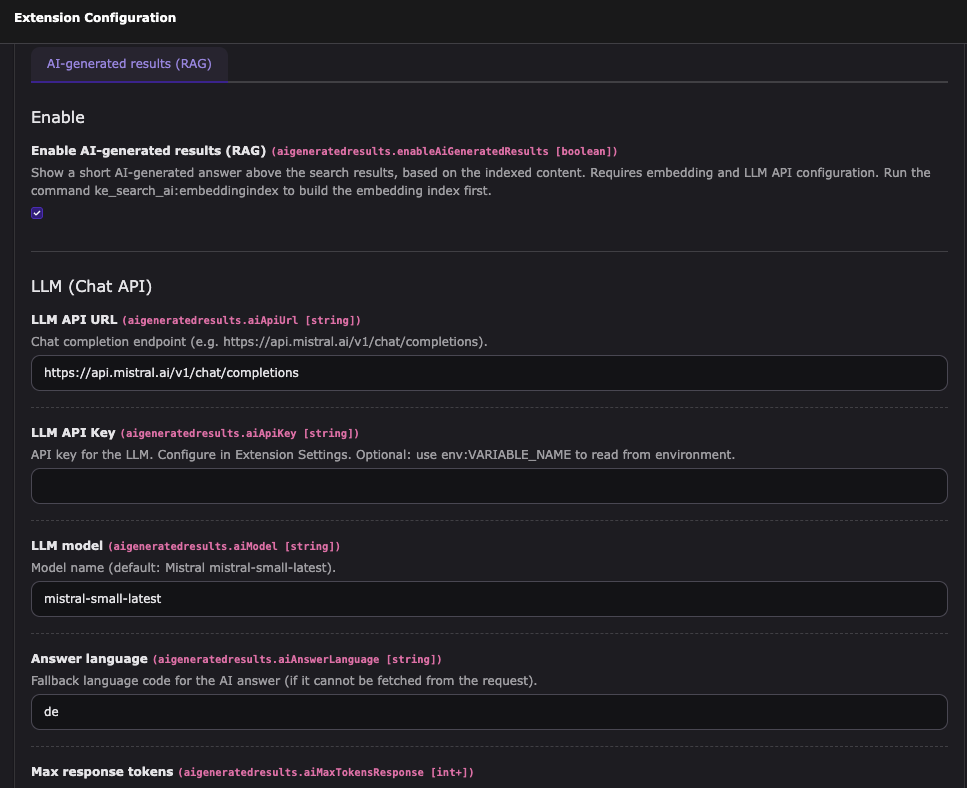
- Enable AI-generated results: Turn the feature on.
- LLM: API URL (default:
https://api.mistral.ai/v1/chat/completions), API key, model (default:mistral-small-latest), answer language (e.g.de), max response tokens. - Embeddings: Embedding API URL (default:
https://api.mistral.ai/v1/embeddings), API key, model (default:mistral-embed). - Retrieval: Top K (number of chunks, e.g. 5–10), minimum similarity score (0–1, default 0.4; 0 = no filtering; typical 0.4–0.6 to exclude irrelevant hits), max characters per chunk.
- Cache: Cache lifetime in seconds for the AI answer per search term (0 = no cache).
- Logging: Log level (default: WARNING). See Debugging.
API keys can be configured in the Extension Settings (Extension Manager → ke_search_ai).
For deployment, you may use env:VARIABLE_NAME as the value (e.g. env:MISTRAL_API_KEY) to read from the environment.
Modifying the system prompt (event)
To change the system prompt sent to the LLM (e.g. to add rules or a different tone),
listen to the PSR-14 event Tpwd\KeSearchAi\AiGeneratedResults\Event\ModifyAiGeneratedSystemPromptEvent.
Security: Do not inject user-controlled or unfiltered input into the system prompt. Use only static or sanitized text so the prompt remains trusted. See Security.
Register a listener in your extension's Configuration/Services.yaml:
YourVendor\YourExtension\EventListener\ModifyAiSystemPrompt:
  tags:
    - name: event.listener
      identifier: 'yourExtensionModifyAiSystemPrompt'
event: Tpwd\KeSearchAi\AiGeneratedResults\Event\ModifyAiGeneratedSystemPromptEventExample listener:
public function __invoke(ModifyAiGeneratedSystemPromptEvent $event): void
{
    $event->setSystemPrompt(
        $event->getSystemPrompt() . ' Only use a maximum of two sentences.'
    );
}The event provides getSystemPrompt() / setSystemPrompt() and getLanguage() (ISO 639-1).